Saturday, 1st May 2010, 01:05 am   | ||
This entry needs translation. To help us and submit a translation please click here
Instructions on how to get your iPhone ECID using Windows.Step One Put your iPhone into recovery mode. If you do not know how to do this then you can follow this tutorial. Step Two Launch the USBView application. If you do not already have this application you can download it here. It is a small free utility provided by Microsoft.  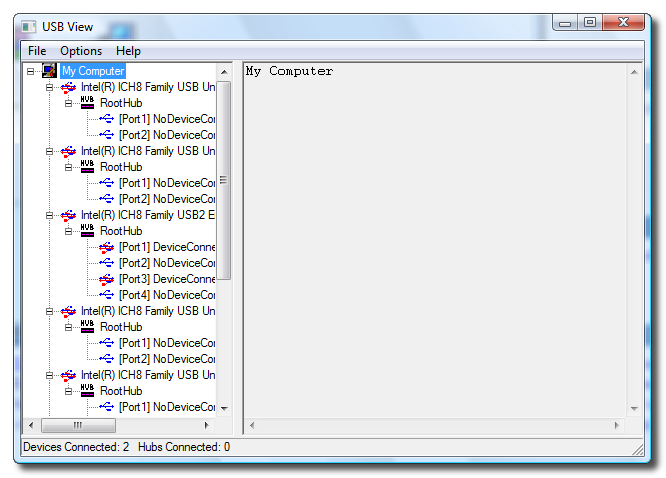 Step Three Click to select Config Discriptors from the Options menu.  Step Four Click to select Refresh from the File Menu.  Step Five Select the Apple Recovery (iBoot) device from the USB Device Tree in the left panel then Copy (highlight and press Control+c) your ECID from the Descriptor fields on the right. 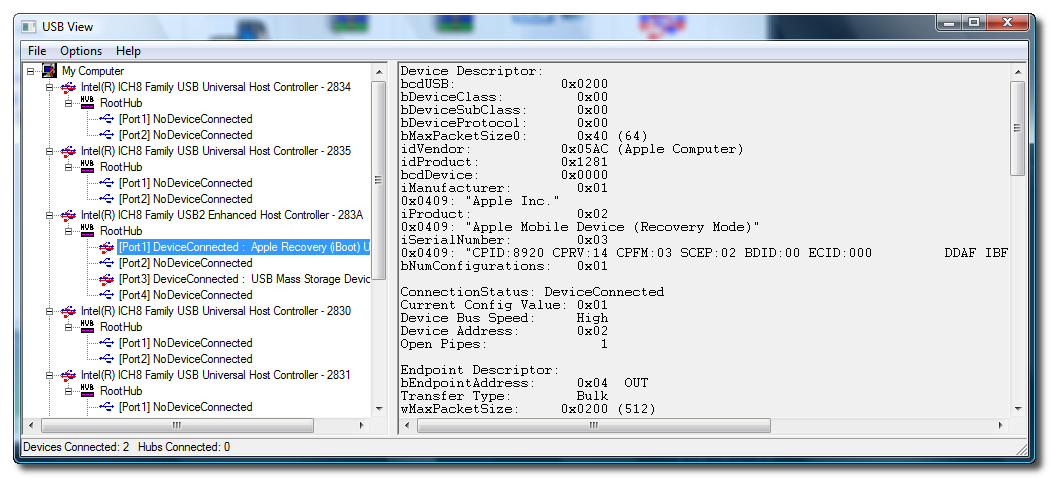
If this tutorial needs to be updated please let us know here
| ||
Friday, 18 November 2011
How to Find Your iPhone ECID [Windows]


Thursday, 17 November 2011
Unlock Your iPhone 4S Without Jailbreaking
A new unlock method has surfaced today which claims to work without the need of any software, hardware or jailbreak.
A bug in iOS 5 discovered by Michael Capozzi theoretically allows any iPhone 4S to be unlocked to any GSM carrier. However, Capozzi says he was only able to test with T-Mobile.
We are currently working towards independent confirmation of his method. It does require you to have an active T-Mobile SIM card (with data working). Remember it must be cut to micro-SIM size to fit the iPhone 4S.
The Steps:
● Insert original carrier AT&T SIM card
● Dial 611 for AT&T customer service hotline and drop the call
● Turn on Airplane Mode
● Take out AT&T SIM card
● Insert T-Mobile SIM card
● Make sure WiFi is off ( also tap on 'Forget this Network" to make sure it doesn't connect automatically later)
● Switch off Airplane Mode and iPhone will search for network. This is followed by the Apple splash screen appearing.
● Activation Required will be displayed on the screen
● EDGE network will activate automatically – notice the 'E' on the top left corner of the screen
● Wait for about 20-30 seconds and turn off the phone
● Turn on iPhone and the same Activation Required screen will be displayed
● When you see one signal bar, tap on Use Cellular Connection
● Eject SIM card
● Activation Required screen will be displayed the second time
● Insert SIM card
● Unlocked!
We are getting some confirmation reports. If you are able to test this, please let us know your results. Remember this method may unlock your device; however, it will not last through a reboot. So while not practical for day to day use. It may benefit those traveling abroad.
Update:
Gizmodo is claiming some confirmation as well.
Read More via chronic
A bug in iOS 5 discovered by Michael Capozzi theoretically allows any iPhone 4S to be unlocked to any GSM carrier. However, Capozzi says he was only able to test with T-Mobile.
We are currently working towards independent confirmation of his method. It does require you to have an active T-Mobile SIM card (with data working). Remember it must be cut to micro-SIM size to fit the iPhone 4S.
The Steps:
● Insert original carrier AT&T SIM card
● Dial 611 for AT&T customer service hotline and drop the call
● Turn on Airplane Mode
● Take out AT&T SIM card
● Insert T-Mobile SIM card
● Make sure WiFi is off ( also tap on 'Forget this Network" to make sure it doesn't connect automatically later)
● Switch off Airplane Mode and iPhone will search for network. This is followed by the Apple splash screen appearing.
● Activation Required will be displayed on the screen
● EDGE network will activate automatically – notice the 'E' on the top left corner of the screen
● Wait for about 20-30 seconds and turn off the phone
● Turn on iPhone and the same Activation Required screen will be displayed
● When you see one signal bar, tap on Use Cellular Connection
● Eject SIM card
● Activation Required screen will be displayed the second time
● Insert SIM card
● Unlocked!
We are getting some confirmation reports. If you are able to test this, please let us know your results. Remember this method may unlock your device; however, it will not last through a reboot. So while not practical for day to day use. It may benefit those traveling abroad.
Update:
Gizmodo is claiming some confirmation as well.
Read More via chronic
Wednesday, 16 November 2011
Black Berry Some Hardware Solutions
83xx Sim Way

Keypad Ways


Keypad Ways
blackberry 8320 charging ways
blackberry 83xx mic ways.
8310 keypad light solution
blackberry 8310/8320 scroll ways.
blackberry 8320 keypad solution...
blackberry 8310 buzzer ways
black berry ringer solution for 9000 bold
black berry ringer solution for 9000 bold
BlacBerry 9000 Diagrame
BlacBerry 8900 Diagrame
Blackberry 9700 camera solution
Blackberry 9000 dead
Blackberry 9700 camera LED solution
Blackberry 9700 white screen solution
Blackberry 9000 usb ways
Tuesday, 15 November 2011
 ALL Firmware Samsung Galaxy P1000 GalaxyTab


Friday, 11 November 2011
JL_CMDER V1.9.4
L_CMDER V1.9.4 Whats new in v1.9.4?
Updated JavaLoader.exe file so it works with OS 7 devices.
NOTE: This is most likely the last update to JL_Cmder as the next handheld OS is supposed to be BBX.
 http://www.mediafire.com/?j0861v773yqcyve
DOWNLOAD LINK::: JL_Cmder v1.9.4.zip
Updated JavaLoader.exe file so it works with OS 7 devices.
NOTE: This is most likely the last update to JL_Cmder as the next handheld OS is supposed to be BBX.
http://www.mediafire.com/?j0861v773yqcyveDOWNLOAD LINK::: JL_Cmder v1.9.4.zip


Subscribe to:
Posts (Atom)